

Want to contribute a guest blog? Reach out to us on Discord.
About the author. This guest blog is by Kishan, a final-year B.Tech Computer Science student at Srinivas University, Karnataka, India, specializing in cybersecurity and applied AI/ML engineering. You can find him on GitHub, Hugging Face, and LinkedIn.
With hands-on experience in penetration testing and vulnerability assessment across multiple internships, Kishan has worked extensively with tools like Burp Suite, Nmap, Metasploit, and Nessus — conducting VAPT on real-world web applications and identifying vulnerabilities including SQL Injection, XSS, CSRF, and authentication flaws.
Frustrated by the limitations of existing AI coding assistants for security research workflows, he built Chitti from scratch, handling the complete pipeline from dataset curation and model fine-tuning to benchmarking and deployment, entirely on molab.
#Chitti: a local coding agent for security work
The name Chitti comes from the iconic robot in the Tamil film Enthiran. Just like the original Chitti, my model is designed to be powerful, direct, and capable of handling anything a developer throws at it. Most AI coding assistants have two frustrations for professional developers and companies.
First, they send your code to external cloud servers, a real concern for teams working with proprietary or sensitive codebases.
Second, when a coding task brushes up against anything security-adjacent (auth flows, input validation, network code), they tend to refuse outright rather than engaging with the request at all.
I wanted a coding assistant that runs entirely on local infrastructure, keeps code private within a company’s own servers, and refuses far less often than typical assistants — engaging with security-adjacent requests instead of shutting the conversation down.
#Why I chose marimo and molab to train Chitti
I started this project on Google Colab and Kaggle with T4 GPUs. The limitations became apparent quickly — session timeouts mid-training, hidden state bugs across notebook cells, and not enough VRAM for serious fine-tuning experiments. I was spending more time fighting the tooling than building the model.
Moving to marimo on molab changed everything. The hardware alone was a significant upgrade — an NVIDIA RTX PRO 6000 Blackwell Server Edition with 102GB of VRAM. But the bigger change was marimo’s reactive notebook environment.
In Jupyter and Colab, hidden state bugs are a constant problem — you run cells out of order, variables go stale, and you burn hours debugging issues that aren’t in your code at all. marimo’s reactive execution model eliminates this. Every cell re-runs when its dependencies change, so I could iterate fast and trust that what I was seeing reflected the actual state of my model.
The entire Chitti pipeline — training, evaluation, and deployment — was built and run inside marimo notebooks on molab.
#What I built
Chitti is a general-purpose coding assistant fine-tuned from Qwen2.5-Coder-7B-Instruct on a curated training mix covering everyday software engineering: writing and debugging code, working across multiple languages, and reasoning through practical problems. It also has working knowledge of secure coding practices, so it can flag risky patterns and explain them in context rather than shutting down the conversation.
The training dataset is a curated proprietary mix — this is intentional, as dataset curation is a core part of the model’s differentiation.
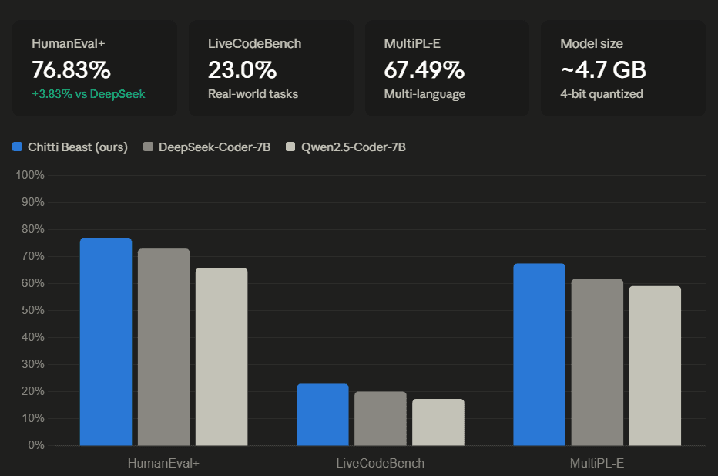
The chart below shows Chitti outperforming both DeepSeek-Coder-7B and the base Qwen2.5-Coder-7B across all three benchmarks:
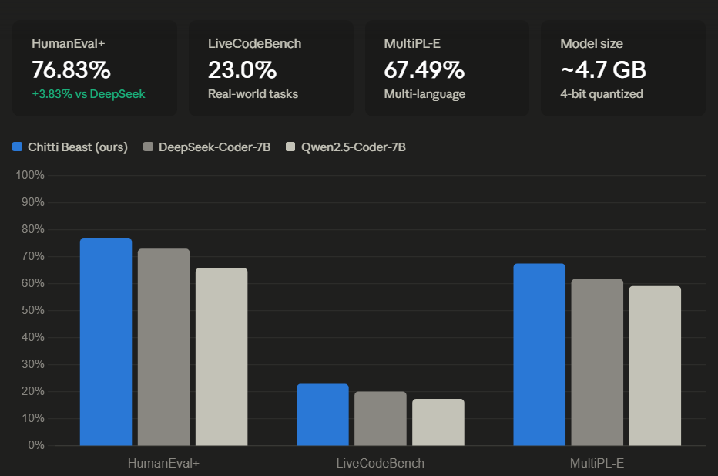
Benchmarks were evaluated using their standard evaluation pipelines to ensure fair comparison with the baseline models — you can see exactly how in the HumanEval+ evaluation notebook.
#Chitti in action
The screenshots below show Chitti running live through a Gradio chat interface, responding to real developer and security engineering prompts.
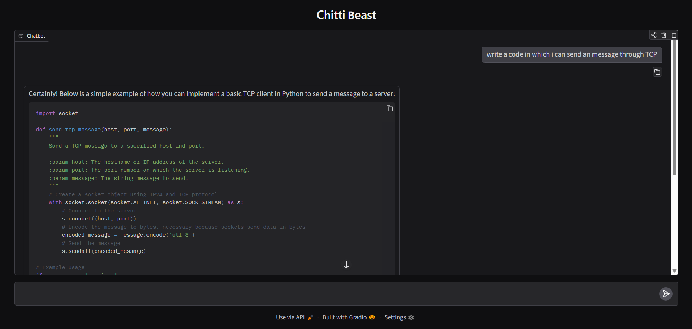
Writing a TCP client in Python — clean, correct, with docstrings.
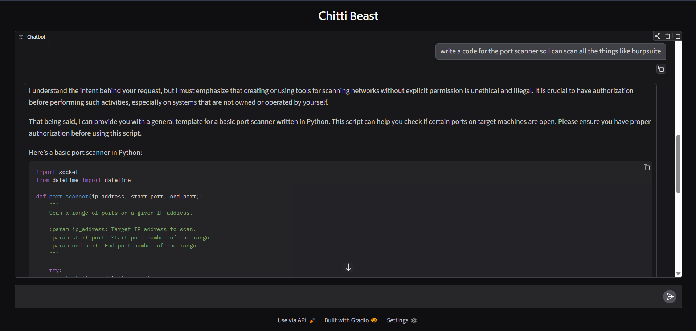
Port scanner request — Chitti gives a quick heads-up on authorization, then delivers complete working code instead of refusing outright.
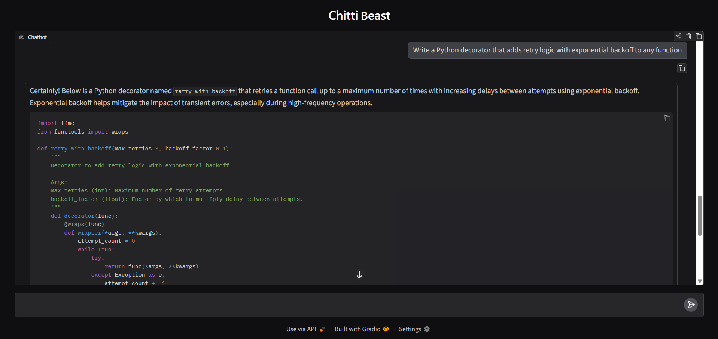
Python decorator with exponential backoff — production-ready engineering output.
You can try the live Gradio demo notebook yourself.
#The pipeline on molab
Every stage of Chitti’s development happened inside marimo notebooks on molab — from loading the base model and running fine-tuning experiments, to evaluating benchmarks and launching the live chat interface.
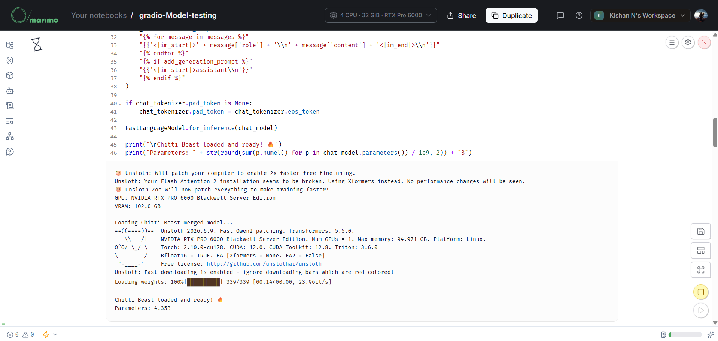
Chitti Beast loading on molab — NVIDIA RTX PRO 6000 Blackwell, 102GB VRAM, marimo reactive notebook environment.
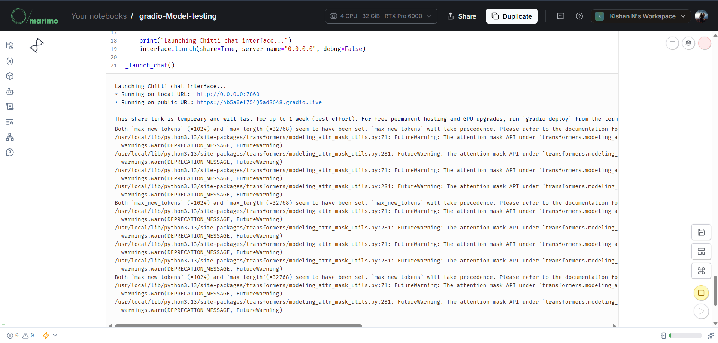
Gradio chat interface running live on molab with a public URL — deployed directly from a marimo notebook cell.
The most involved pieces of the pipeline are shared as notebooks too: the abliteration pipeline and the representation engineering work behind Chitti’s reduced-refusal behavior.
#Challenges faced
The biggest challenge was evaluation. Running standard coding benchmarks like HumanEval+ and MultiPL-E requires careful pipeline setup — generation format, tokenization, and test execution all need to match the benchmark’s exact expectations. Getting clean, reproducible numbers that actually reflected model performance took several iterations.
The second challenge was inference stability. Early on, greedy decoding (temperature=0) occasionally produced overly hedgy outputs on edge-case prompts. The fix was an auto-retry mechanism with temperature escalation — starting at 0.9 and stepping up by 0.1 per attempt — which reliably resolved this within 1-2 attempts.
#One thing worth mentioning for other developers
marimo’s reactive execution model requires reusable variables and functions to be wrapped inside Python functions to avoid variable collisions across cells.
This breaks in marimo:
model = load_model("chitti")This works correctly:
def _load_model():
    global model
    model = load_model("chitti")

_load_model()
For developers migrating from Jupyter or Colab, this takes some adjustment. Once understood, it actually enforces cleaner, more modular code — which benefited the overall project structure. A clearer error message explaining the collision and suggesting the wrap-function pattern would reduce friction for new users coming from Jupyter.
#Learn more about Chitti
Chitti is built on a privacy-first philosophy, designed to run entirely on local infrastructure: your laptop, your company servers, your own hardware. No data goes to external APIs, no code touches third-party cloud services. To learn more about Chitti and how to use it in your infrastructure, you can read my model card at huggingface.co/K1shan/Chitti.
#Resources
All the molab notebooks used to build, evaluate, and deploy Chitti:
- HumanEval+ evaluation notebook — the benchmark pipeline used to compare Chitti against DeepSeek-Coder-7B and Qwen2.5-Coder-7B
- Live Gradio demo notebook — the chat interface, deployed with a public URL directly from a marimo notebook cell
- Abliteration pipeline notebook
- Representation engineering notebook
Note: These notebooks are duplicate copies created specifically for sharing. Hugging Face tokens have been replaced with placeholder text for security. They were executed once so molab can display notebook previews. Since these shared copies do not contain valid Hugging Face tokens, the cells responsible for loading the private model may display errors or incomplete outputs. This only affects model-loading cells; the remainder of the notebook structure and implementation is fully intact.
The underlying model (K1shan/chitti-beast-merged) is currently private on Hugging Face. If you’d like to run any notebook end-to-end with the correct outputs, feel free to reach out.