Introducing marimohub

A self-hostable notebook platform to store, manage, and run marimo notebooks on your own infrastructure.

A marimo notebook can run almost anywhere. The harder problem begins when a team needs to run notebooks together: someone has to provide durable storage, isolated compute, single sign-on, access control, version history, and notebook lifecycle management.
Today, we’re introducing marimohub, an open-source, self-hostable platform for storing, managing, and running marimo notebooks. It provides that shared notebook layer while letting you choose where data lives, where code runs, and how users are authenticated and authorized.
- Your backends. Choose your storage, compute, and identity providers.
- One durable store. Notebook source, versions, metadata, and system records live together, without a separate database.
- The whole workflow. Edit notebooks, connect data, publish apps, schedule jobs, and work with agents from one deployment.
- Open source. marimohub is licensed under Apache 2.0 and runs in your cloud or on your hardware.
marimohub is available today on GitHub, with deployment guides and a live configuration generator in the documentation.
#Bring your own backends
Some teams want to self-host Kubernetes; others want serverless sandboxes. Some use a single public cloud, while others need an S3-compatible system inside their own network. A notebook platform should fit that stack, not replace it.
marimohub treats its three external dependencies as replaceable backends:
| Decision | Built-in options |
|---|---|
| Storage | CoreWeave CAIOS, S3-compatible storage, Google Cloud Storage, Azure Blob Storage, filesystem, or Cloudflare R2 |
| Compute | CoreWeave Sandboxes, W&B, Modal, AWS ECS Fargate, Kubernetes, Docker, Podman, E2B, Cloudflare Containers, or local processes |
| Identity | OpenID Connect, trusted SSO proxies, Google IAP, or Cloudflare Access |
Each backend sits behind a small TypeScript interface. The core notebook logic
does not depend on vendor SDKs, so the same hub can be configured for the
providers you already use. Most deployments select adapters with MARIMOHUB_*
environment variables and run the published container image or Linux binary.
For further customization, you can compose marimohub’s packages as a library
with your own backend adapters.
The deployment guides cover a single Linux server, Helm, CoreWeave, Kubernetes, AWS, GCP, Azure, and Cloudflare.
#One object store, no database
marimohub has no separate database. Notebook source, version history, snapshots, audit events, and coordination records all live in the storage backend.
Back up the bucket to back up the hub. To restore, point a fresh deployment at a consistent bucket snapshot; there is no second database backup to reconcile. The API and web tier remain stateless and can scale horizontally behind a load balancer.
This design requires a storage backend with atomic conditional writes.
#Team workflows, ordinary Python files
Underneath the projects, permissions, and scheduling, notebooks remain the same Python files you can run with marimo. marimohub adds team workflows, but does not change the original file format.
#Organize work and access
When you work with teams, it makes sense to structure the work into different projects. Projects in marimohub group related notebooks, members, integrations, and environment configuration. Add tags to keep a growing catalog navigable, or switch to a gallery view to browse notebooks by their outputs.
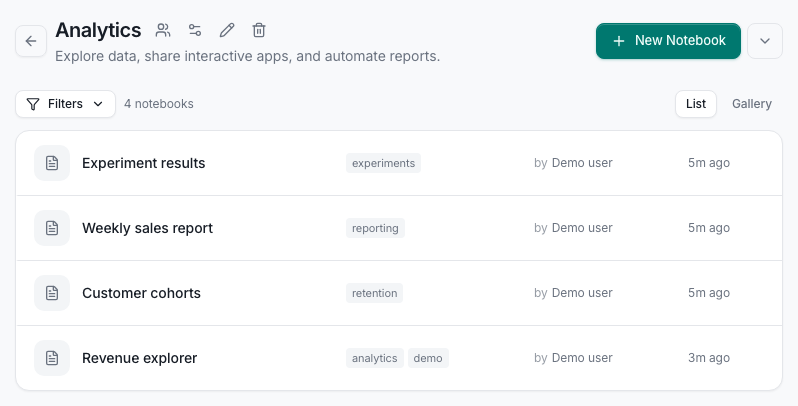
Organize notebooks into shared projects with tags and member access.
App users can run shared apps without access to source code. Viewers can inspect notebooks and saved outputs, editors can change them, and managers control membership and sharing.
#Keep a version trail
Each edit session records a notebook version in storage. Compare versions side by side, inspect the code that changed, and restore an earlier version when an experiment takes a wrong turn.
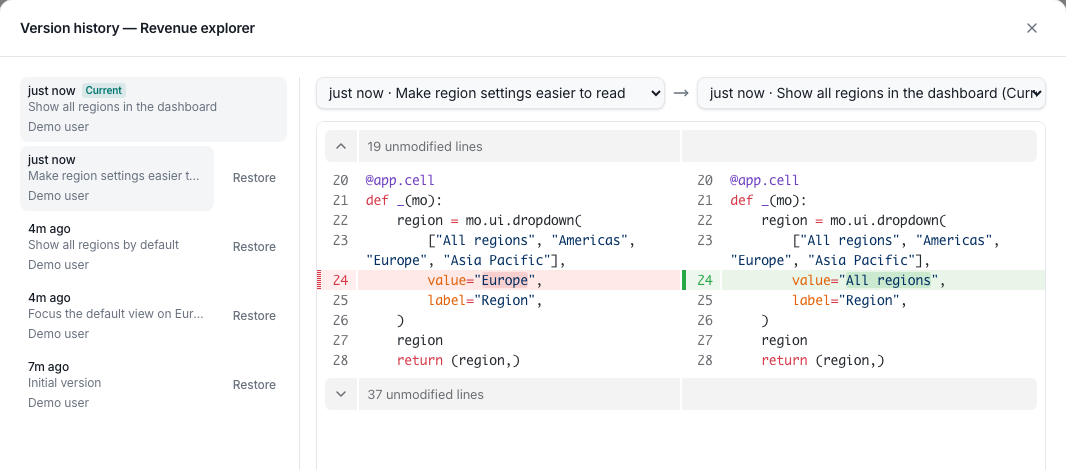
Notebook history lives beside the notebook in your object store.
Notebooks can also track a GitHub repository. Pull the latest commit from GitHub or push a repository archive from CI; each sync becomes a versioned record in the hub.
#Connect data once
A project manager connects databases, catalogs, query engines, object stores, and ML platforms once. Each new notebook session receives the applicable configuration. The Data page allows you to browse your SQL datasources or object stores. Add an AI provider to enable AI generated queries.
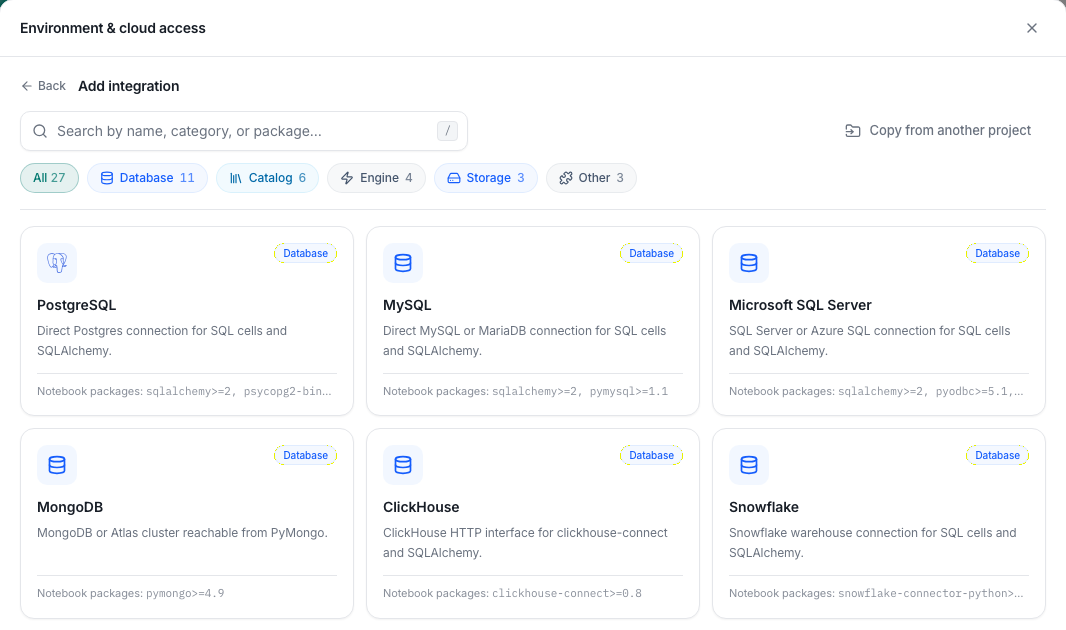
Connect project data sources through a versioned integration catalog.
Sensitive values can be encrypted or resolved from external secret stores. For cloud access, short-lived federated credentials let notebooks reach approved resources without copying long-lived keys into the sandbox.
#Publish an app without exposing source
Any notebook can run as an interactive app for people who do not need the editor. App users see controls and outputs, while their role denies access to modifying the notebook.
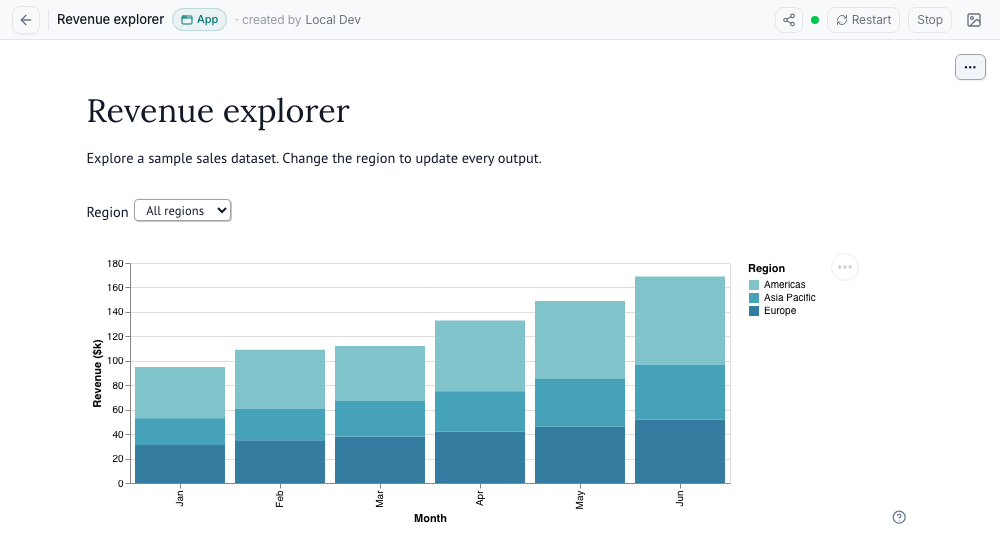
Share a notebook’s interactive interface without exposing its source.
marimohub handles app deployment, seamless version transitions (blue/green-style rollouts), reclamation of idle compute, and horizontal scaling based on user count.
#Automate notebooks and hand work to agents
Turn a notebook into a recurring job without rewriting it as a separate
pipeline. Each run records the notebook version it started from, accepts
parameters through mo.cli_args(), executes in a fresh sandbox, and keeps its
rendered output and logs. Jobs support timeouts, retries, concurrency limits,
and manual or cron-based execution.
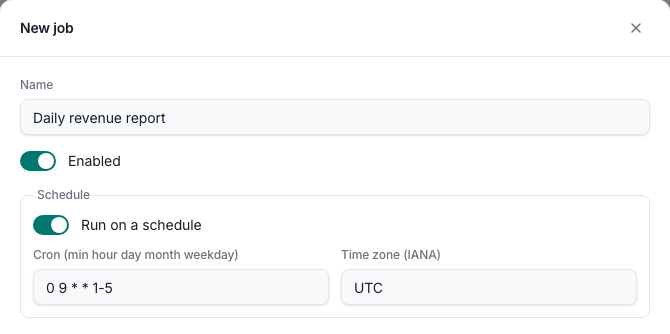
Run notebooks on demand or on a cron schedule with an IANA time zone.
marimohub also includes an optional MCP server. With the connected user’s permissions, an agent can discover notebooks, read or update source, start a session, execute code, and create or monitor jobs.
Operators can also provide managed AI through OpenAI-compatible providers. The upstream key stays on the marimohub server; notebook sessions receive short-lived credentials instead.
#Ready to operate
marimohub ships health checks, authenticated dependency checks, OpenTelemetry traces, metrics and logs, audit events, startup diagnostics, session limits, and warm sandbox pools. A maintenance worker saves active editors, reclaims idle sandboxes, and dispatches scheduled jobs, while stateless API replicas serve users.
Read the security and operations guides before a production rollout.
#Choosing between marimo, molab, or marimohub
There are many ways to run marimo, but there are different use-cases that we have in mind for our tools.
marimo is the open-source reactive notebook itself. You can run it locally, put it in Git, and deploy it wherever you like.
molab is our hosted service for creating and sharing notebooks without operating infrastructure. At the time of writing it also offers free GPUs.
marimohub is for teams that want a shared notebook platform on infrastructure that they control. You operate the storage, compute, and identity providers; marimohub connects them into one system.
#Try marimohub
The development stack requires Node 24+ or newer, pnpm 10+, and uv. Clone the repository and run:
git clone https://github.com/marimo-team/marimohub.git
cd marimohub
pnpm dev
This starts marimohub with in-memory storage, local compute, and development authentication. It is intentionally non-durable and meant only for evaluation. The getting-started guide walks through choosing production storage, compute, and identity backends, then generates the configuration for your deployment.
We’re developing marimohub in the open. If you run into a problem or want to help shape what comes next, star the repository, read the contributing guide, or open an issue.