
Run marimo notebooks on any cloud with SkyPilot


Notebooks are widely used for interactive computing, and for good reason. They support fast iteration, immediate feedback, and exploratory workflows that are difficult to replicate in other formats.
The difficulty typically appears later, when a notebook needs to be run outside of an interactive environment. Most production tooling is designed around Python files rather than .ipynb, which introduces friction when moving from exploration to execution. Over time, this gap has led to workarounds, rewrites, or parallel code paths.
marimo addresses this directly by representing notebooks as reproducible Python programs. Because of this, a marimo notebook can be executed from the command line, checked into version control, and integrated with standard tooling without conversion. This preserves the advantages of notebooks while removing a common barrier to deployment.
At that point, execution becomes an infrastructure problem rather than a notebook problem.
#The portability problem
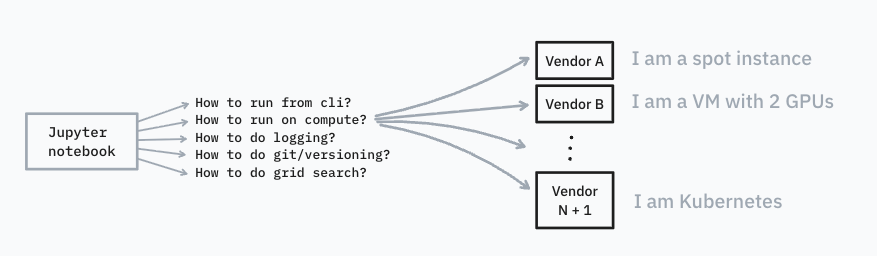
There’s no shortage of compute platforms. But they all come with their own workflow, config format, and opinion about how things should be run.
The result isn’t portability — it’s fragmentation. Code that works on one cloud setup often fails the moment you move teams, companies, or providers. The underlying Python remains, but everything around it changes.
Enter SkyPilot.
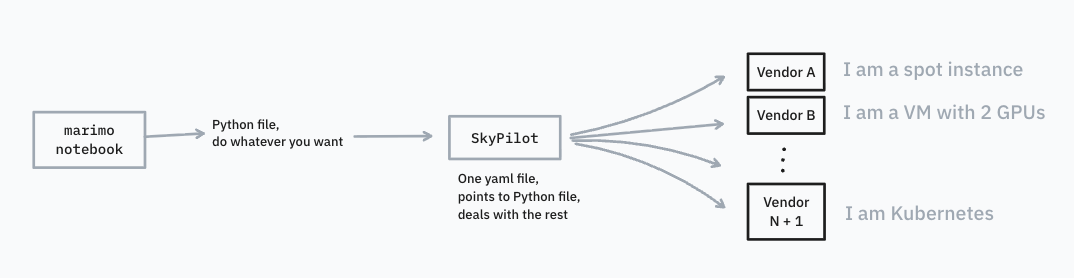
Instead of rewriting your project for every platform, SkyPilot lets you describe what you want to run and what it needs. SkyPilot handles the rest, determining where and how to run it.
Same code. Different clouds. Minimal ceremony.
#Setting up with marimo
To get an impression on how to set this up, let’s start with a simple marimo notebook (saved as a Python file):
# /// script
# requires-python = ">=3.12"
# dependencies = [
#     "marimo",
# ]
# ///

import marimo

__generated_with = "0.18.1"
app = marimo.App(sql_output="polars")

@app.cell
def _():
    import marimo as mo
    return (mo,)

@app.cell
def _(mo):
    print(mo.cli_args())
    return

if __name__ == "__main__":
    app.run()
This notebook uses mo.cli_args() to parse command-line arguments. In a real workflow, those arguments might control a training run, dataset selection, or hyperparameters, but we’ll skip that for simplicity.
You can run the notebook directly from the CLI:
uv run demo.py --hello world --demo works --lr 0.01The output confirms that the notebook received the arguments:
{'hello': 'world', 'demo': 'works', 'lr': '0.01'}At this point, the notebook is already behaving like a normal Python program.
#Adding compute with SkyPilot
Now let’s give it real compute.
SkyPilot can provision resources with a single command. After setting up credentials for your cloud provider, you can launch a named cluster like this:
sky launch -c my-cluster --infra gcp --gpus V100:1 --cpus 16 --memory 32Once the cluster exists, we can use it to run our marimo notebook. We have two options to do so:
- SSH into it and run marimo directly
- Run the notebook as a managed job
For managed jobs, SkyPilot uses a simple YAML configuration:
# marimo-demo.yaml
name: marimo-demo

# Specify specific resources for this job here
resources:

# This needs to point to the folder that has the marimo notebook
workdir: scripts

# Fill in any env keys, like wandb
envs:
    WANDB_API_KEY: "key"

# We only need to install uv
setup: pip install uv

# If the notebook is sandboxed via --sandbox, uv takes care of the dependencies
run: uv run demo.py --hello world --demo works --lr 0.01
Launch the job with:
sky jobs launch -n marimo-demo marimo-demo.yamlSkyPilot will prompt you to select a cluster, including the one you just created. From there, the notebook runs as a managed cloud job. Logs and status are available via sky dashboard.
#Going further with marimo x SkyPilot
This setup already covers a lot of ground, but SkyPilot can do more.
Instead of targeting a specific provider, you can describe required resources and let SkyPilot search across clouds for the best option (including spot instances when appropriate). The same mechanism works for batch jobs, model serving, and parallel sweeps.
#A shared philosophy
There’s a clear parallel between marimo and SkyPilot.
- marimo provides a unified environment for coding in Python, seamlessly allowing developers to move from prototype to production
- SkyPilot provides a unified approach to running that work, across clouds and environments
Both tools extend further by defining less.
Before:
After:
- marimo: github.com/marimo-team/marimo | Docs | Discord
- SkyPilot: github.com/skypilot-org/skypilot | Docs | Blog | Slack