

marimo pair lets coding agents such as Claude Code and Codex CLI use a marimo notebook as a tool. It combines a CLI that runs Python in the notebook’s live kernel with an agent skill that teaches the workflow. From inside the live kernel, an agent writes and runs code, inspects results, and commits its work as notebook cells. It can work independently or alongside you.
Our first version adapted the notebook to the tools coding agents already had.
The agent inspected the running notebook through read-only MCP tools, but
changed it by editing the .py file and relying on --watch to reload the
file. The split added overhead and left the agent to coordinate feedback across
tools.
For the second version, we redesigned the interaction around the running notebook. We gave the agent Python for inspecting live state and an internal API for changing notebook cells. This post explains how we arrived at that design and how marimo checks and preserves the agent’s work.
#Beyond the shell
Out of the box, coding agents have tools for reading and editing files and running shell commands. That toolset fits conventional software development because the work is stored in files and a set of changes can usually be checked by running tests or a build.
For data work, people often prefer a different set of tools that retain intermediate values between steps (for example, Excel, RStudio, Jupyter, and marimo). This statefulness enables fast iteration, but it also introduces challenges for reproducibility. Because results can depend on state accumulated during a session, a tool must preserve enough information to recreate them. Tools differ in whether they capture this information at all and how much they preserve when they do.
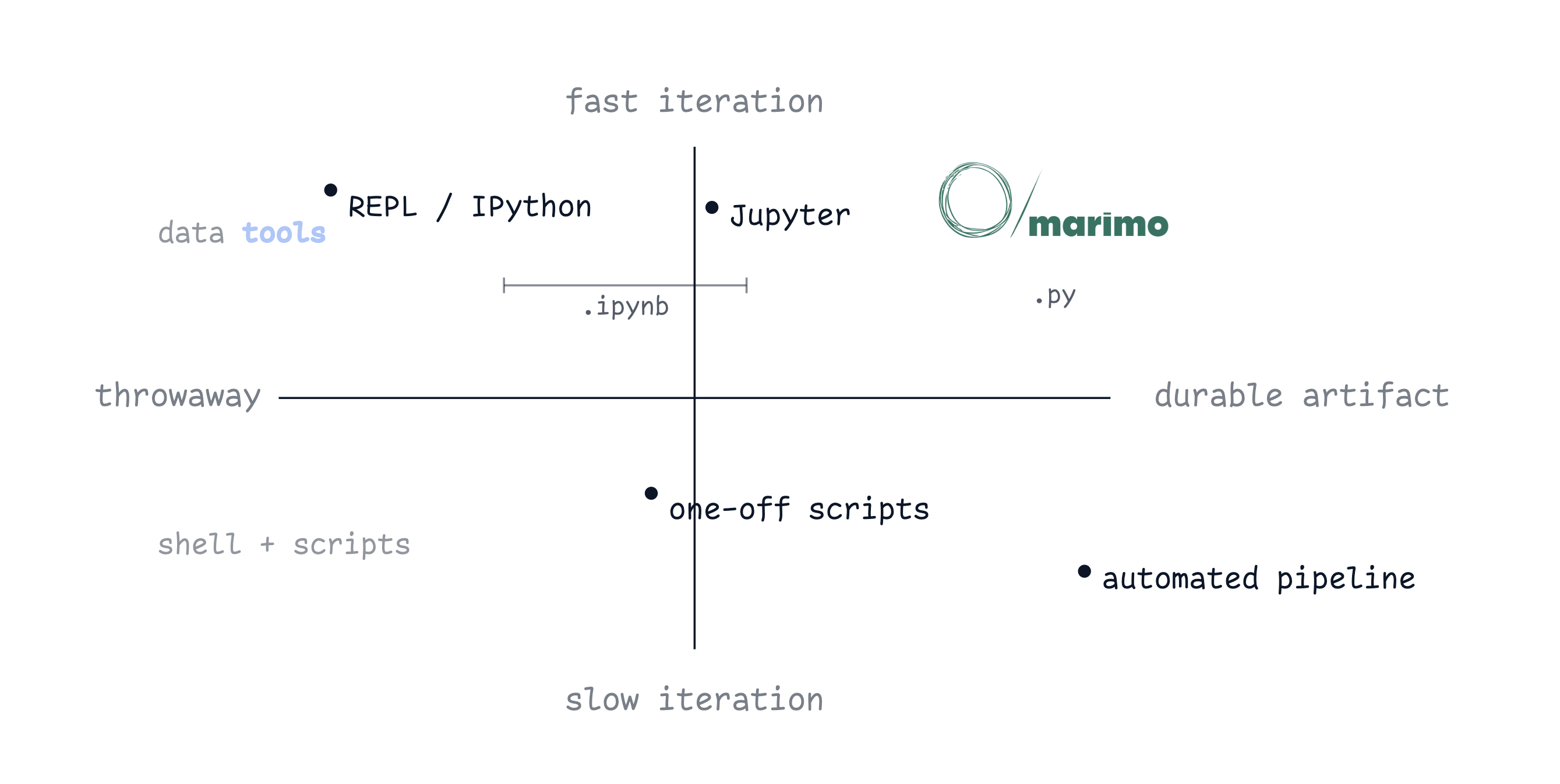
As coding agents became part of our users’ workflows, they wanted to use them in notebooks too. The experience was poor. Agents could change notebook code, but could not readily inspect the live values and outputs that guide the work.
We wanted agents to use notebooks the way people do. They should be able to run code, inspect results, decide what to try next, and preserve useful work so it can be resumed later or shared with others.
#The MCP detour
Our first version adapted the notebook to the tools coding agents already had.
The agent edited the .py file with its normal file tools, relied on --watch
to load changes into the notebook, and queried marimo’s original MCP
server for the running
state.
The MCP tools worked for questions we had anticipated, such as reporting notebook structure or previewing common data structures. Each tool exposed a fixed view, while what the agent needed to inspect depended on the notebook and the task.
Reading and writing also followed different paths. After editing the file, the
agent had to wait for --watch and query one or more MCP tools to inspect the
result. The extra calls added latency and token use, while reliable feedback
depended on the agent coordinating the sequence.
We considered adding more endpoints (#4345, #7133, #7625, #8172, #8175, #8176). They could cover more cases, but they would not fundamentally change how the agent worked with the notebook. We would still decide in advance what the agent could inspect, and the agent would still coordinate edits with separate queries. We needed to let the agent decide what to inspect as it worked, act on the running notebook, and receive direct feedback.
#Give the model Python
In the next version, we gave the agent a CLI for running Python directly in the live marimo kernel.
bash scripts/execute-code.sh -c "print(df.head())"execute-code replaced the read-only MCP tools. Each call runs in a scratchpad
where the notebook’s variables are in scope and anything the agent defines
stays local to the call. The agent writes Python to inspect whatever state it
needs, and the call returns the resulting values and errors directly. Runtime
inspection changes how the agent works with the notebook by letting it decide
what to examine based on the objects and results it encounters, then use that
feedback in its next action. Python gives the agent a general-purpose language
for doing this, and coding agents already know how to write it.
execute-code gave the agent access to the kernel’s live state. It could
inspect variables and run temporary code, but it had no supported way to
inspect cells or make durable changes to the notebook. We needed to expose the
notebook’s structure and operations through Python as well.
#Harden the common path
execute-code builds on marimo’s existing
scratchpad,
which runs Python against the notebook without changing it. We opened that to
agents and tested how much notebook functionality they could discover through
Python.
“Can you say hi to me in the marimo UI?”
Claude tried several APIs, hit errors, and eventually displayed a toast saying “Hi Trevor 👋!” in the corner of the notebook.
“OK, how did you do that?”
We knew the toast API existed and were curious whether Claude could find it through Python. After a few attempts, it did. We then asked it to create, edit, and run cells. Claude could discover and sequence the internal calls, but the task required it to understand marimo’s internals and coordinate each step.
Direct Python access was enough for one-off experiments, but common notebook operations needed stable calls and structured results. Creating a cell should not require the agent to understand marimo’s internals, and a failed edit should identify what went wrong.
We kept Python as the general interface and added a small API for common notebook operations, with ordinary calls and predictable results.
#Code mode
Code mode exposes notebook structure and operations through an internal Python
API built for agents. The module is available inside execute-code.
import marimo._code_mode as cm

async with cm.get_context() as ctx:
    cid = ctx.create_cell("df.head()")
    ctx.edit_cell(cid, code="df.head(20)")
    ctx.run_cell(cid)
The agent uses cm from inside Python rather than as a separate tool. It
imports cm and writes normal Python around the notebook operations, including
loops, helpers, and error handling. The operations queue inside the async with
block and are applied on exit as one transaction against the notebook.
async with cm.get_context() as ctx:
    a = ctx.create_cell("x = 1")
    b = ctx.create_cell("x = 2")  # x is now defined in two cells
    # nothing has run yet
# on exit: marimo rejects the batch
# ("x" is multiply-defined across the graph)
The async with block is the transaction boundary. Before applying the queued
operations, marimo runs the checks it uses for any notebook edit. It looks for
syntax errors, names defined in more than one cell, cycles in the dependency
graph, and the removal of names that other cells use. If a check fails, marimo
rejects the whole batch, names the cells at fault, and leaves the notebook
unchanged.
When the batch runs, marimo reports each cell’s result back to the agent as clean, errored, or broken by an upstream change. The agent can use those results to decide what to fix next.
#An API for a model
cm is not a public, versioned API. Its caller is a model, and the model can
read the API at runtime.
>>> help(cm)
Help on package marimo._code_mode in marimo:

NAME
    marimo._code_mode - Code mode: programmatic notebook editing via
    async context manager.

DESCRIPTION
    Internal, agent-only API. Not part of marimo's public API. No
    versioning guarantees. May change or be removed without notice.

    Usage:

        import marimo._code_mode as cm

        async with cm.get_context() as ctx:
            cid = ctx.create_cell("x = 1")
            ctx.edit_cell("my_cell", code="z = 42")
            ctx.delete_cell("old_cell")
The skill tells the agent to run help(cm) when it starts. The docstring holds
the examples and the current shape of the API, so the skill and the
implementation can change independently.
We wrote earlier skills like
marimo-notebook
that described marimo’s execution rules so agents could edit the .py file
correctly. The model had to keep rules about dependencies, multiple
definitions, and re-execution in its context and apply them throughout the
task. Code mode moves that responsibility into marimo. Every edit goes through
the same checks as an edit made in the UI. If a change violates a rule, marimo
rejects it with a specific error so the agent can correct it and continue.
Together, runtime inspection and these checks give the agent direct feedback throughout longer tasks, so it can correct errors and continue without a person stepping in.
#More than a REPL
When we launched marimo pair on Hacker
News, some of the discussion
compared it to giving agents a Python REPL. The comparison describes the
execution layer, where execute-code accepts Python, runs it in the kernel, and
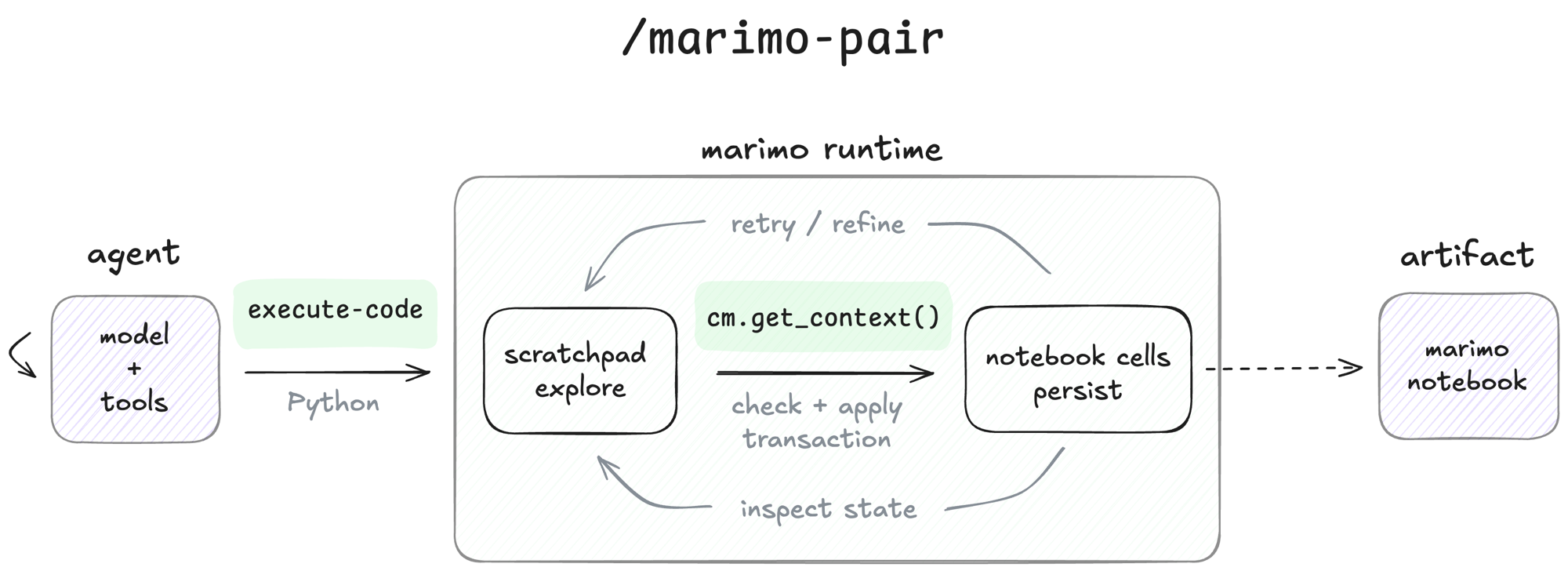
returns the result. Over a longer task, marimo distinguishes temporary code
used to inspect state and try ideas from code the agent decides to preserve.
The agent uses execute-code as a scratchpad without changing the notebook.
When it wants to preserve a step, it commits the code as cells through cm.
marimo checks the batch using the same rules as an edit made in the UI, rejects
invalid changes before they take effect, and adds accepted cells to the
notebook’s dataflow graph and .py file.
Temporary attempts remain in the scratchpad, while accepted cells incrementally build a reproducible Python program that can be rerun and reviewed.
#Notebooks as a tool
Our first design separated observation, action, and validation across different interfaces. The model had to assemble those pieces into a reliable loop, and adding more tools would only expand what each piece could do.
In the current design, all three happen against the running notebook. The agent inspects state with Python, changes cells through code mode, and receives validation and results directly from marimo. The model decides what to try, while the runtime handles the notebook’s execution rules.
Because accepted changes become cells, the same process that supports iteration also builds a reproducible Python program. Each accepted step extends a notebook that can be rerun, reviewed, and continued by a person or an agent.
- Deterministic execution. Cells run in dataflow order, not authoring order, so the notebook replays the same way elsewhere.
- A Python artifact. The notebook is a
.pyfile that is git-diffable, importable, runnable withpython notebook.py, and deployable withmarimo run. - No hidden state. Upstream changes invalidate the cells that depend on them, which avoids the “run cells 4, 7, 2, 9” problem common in shared Jupyter notebooks.
- Checked commits. Every cell
cmaccepts has passed marimo’s static checks for syntax, names defined in more than one cell, cycles in the dependency graph, and removing names other cells use.
#Try it
marimo pair is available now.
It works with any agent that supports Agent Skills.
npx skills add marimo-team/marimo-pairPair on an existing notebook.
/marimo-pair pair with me on my_notebook.pyOr hand it a question and let it build the notebook end to end.
/marimo-pair build me a notebook that explores <dataset/question>Learn more and get started at marimo.io/pair.