WaveSurfer Audio Widget
by Joseph Berry
Custom audio widget for annotation using anywidget and wavesurfer.js.
About this notebook
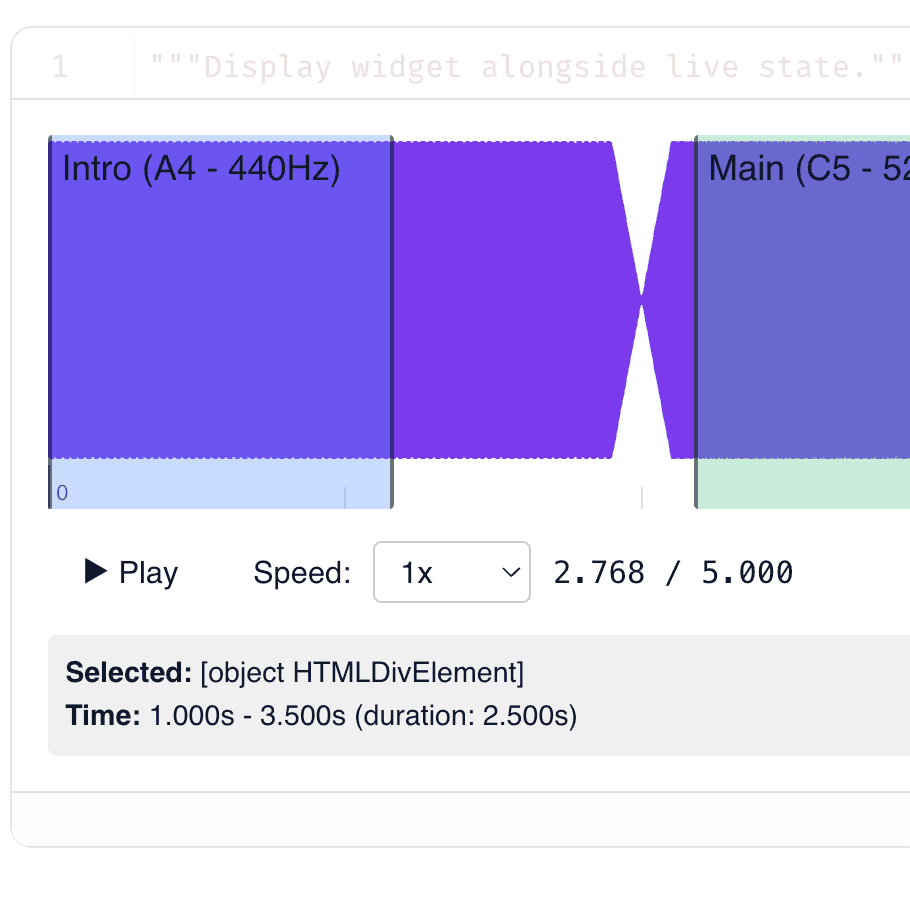
This notebook builds an audio waveform widget in marimo. It uses anywidget and traitlets to wrap wavesurfer.js. The default audio is a 5-second synthetic clip. NumPy generates this clip from three sine waves. The three pitches are A4, C5, and E5. Together they form an A major chord. You can also upload your own MP3, WAV, OGG, or M4A file.
The widget shows the waveform, a timeline, and playback controls. Press Play to start the audio. A menu sets the playback speed from 0.5x to 2.0x. The clip has three colored regions named Intro, Main, and Outro. Drag a region edge to change its start or end time. Click a region to select it and read its times. A table below lists each region with its start, end, and duration. Click a table row to move the playback position to that region.
Traitlets synchronize the Python and JavaScript state in both directions. The widget loads wavesurfer.js version 7 and its region and timeline plugins from a CDN. NumPy writes the sample as a 16-bit mono WAV file in memory at 22050 Hz. An Export button writes the current regions to JSON. The notebook shows this JSON in a read-only editor.