About this notebook
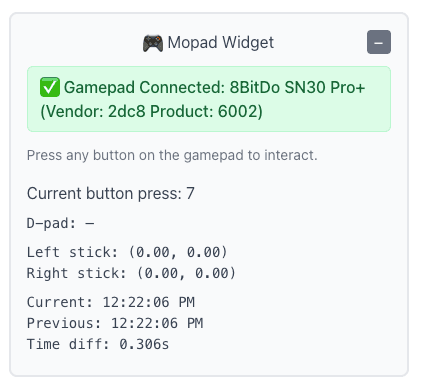
This notebook reads gamepad events from your browser. It uses marimo and the GamepadWidget from the wigglystuff library. The widget streams button presses, d-pad status, and analog stick axes. There is no stored dataset. The data comes live from a controller that you connect to the browser. marimo wraps the widget with mo.ui.anywidget so the notebook can read its state.
To use the widget, connect a controller or pair a Bluetooth one. Then press any button. The notebook shows the last button press, the change timestamp in milliseconds, and the previous timestamp. It also shows the left and right stick axes as pairs of numbers rounded to two decimals. The d-pad row shows arrow symbols for each direction you hold. When no direction is active, the row prompts you to tap the arrows.
The widget exposes attributes such as axes, dpad_up, current_button_press, and current_timestamp. The notebook reads these attributes and formats them with mo.md and mo.vstack. When no axis data exists yet, the code falls back to four zero values. The button value shows a dash when no press has a non- negative index.